



I can see this is the most hot topic and tags for ‘S-Curve in Excel’ is the highest!! Therefore, I’ll give priority for this topic and here it goes!
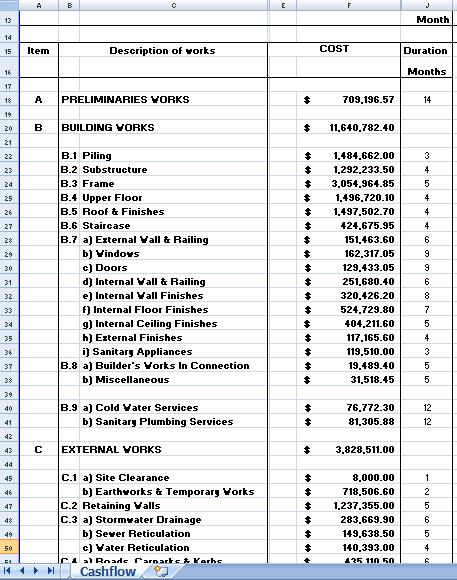
Step 1: Get Bill of Quantities (BQ) from Quantity Surveyor (QS) & tabulate as follow:
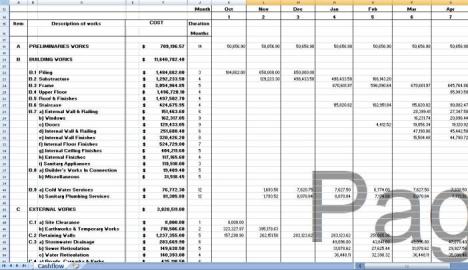
Step 2: With the input from your approved schedule, tabulate the cost into Month i.e. Preliminaries Works $709, 196.57 divide with 14 months = $50,656.90/month. Please remember this is linear tabulation & the accuracy is between 70%-80%. To get more accurate, breakdown Preliminaries activity into more detail instead of single line.
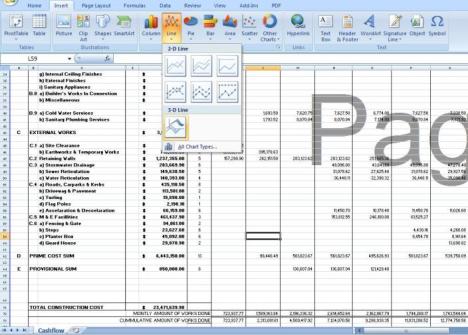
Step 3: Insert 2D or 3D lines and Select Data from Cummulative Amount.
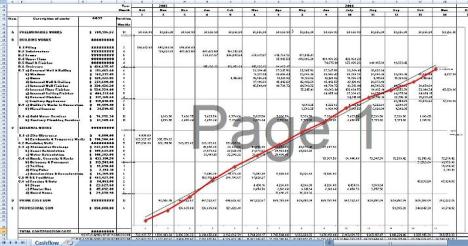
Step 4: You can generate your Planned Value (PV) S-Curve now! Please remember to key in another 2 lines which is Actual Cost (AC) & Earned Value (EV) to measure your Cost Performance Index (CPI) & Schedule Performance Index (SPI). Good luck!
Filed under: Scheduling & Planning | Tagged: cash flow, scurve in excel |
 farest planner
Learn to draw S-curve on Crtitical path duration of Power Boiler project
hi frend pls send me a copy of s curve and how to plot. tanx.
hey i want to know how to draw an s-curve for the projects
and also the importance and other stuff related to S-Curves..
can anyone mail such a material to sreekanth.civil@yahoo.co.in
pleasee
i recently designed an ms program that parses automatically data from primavera 6 SDK and generate s-curve in excel. if interested kindly send me an email. this works in office 2007.
Hi can you send me the soft copy of S curve in excel . Is there any equation you are using ?
post your email and i will send it to you asap.
Hey could you send an s-curve template to me email address thanks.
kindly send me as well the s curve by email. Thank you, very appreciated
Dear Friend,
Please provide me with the required to draw the S- curve in P6.
Thanking you,
Syed Nadeem
I will be very thankful if you can give me the ms program.
Email :shahzaib_83@hotmail.com
Thanks
I’d appreciate the s-curve program.
Thanks
Hi please email me the method to draw s curve in excel from primavera. thanks
I am new to primavera and would want to be shown how to generate an scurve using excel.
I will appreciate it if you put me through.
Many thanks
Adrianne,
I would like to see this if you are still around.
Hi Adrianne are you able to send this to me, I would be very gratefull,
Philip UK
Hi adrianne. I also interested regrading this matter. Kindly can u email to husnieys@gmail.com
Thanks Adrianne..
please sent a copy to abocha@gmail.com
hello sir…can u e.mail me the same to sudhakar.vuriti@gmail.com
thanks
Hi Adrianne
I am working on Primavera P6 and would love to generate s-curve in excel. Can you please send me the ms program you have designed
hi arianne..i’m interested with this program..can you please send it to my email..a.s.a.p. tnx……here’ my e-mail..i’m hoping i can receive it now..because i had a project about this s-curve..i don’t have any idea how to start…plsss i’m begging..send it as soon as possible..thanks..cienel19@yahoo.com
Hi Adrianne
Pls,I don’t mind the ms program.my e-mail address is olaniyiadetifa@yahoo.com
could u please send me @ fayazawan@gmail.com
hi Adrianne,
I would welcome a copy of the software aslo my email is jv3167@yahoo.com
thanks in advance,
jan
Hi Adranne,
If the offer is still on, do send same to my email:
gbokiwizz@yahoo.com.
Thanks so much,
cheers,
seyi
hey i want to know how to draw an s-curve for the projects
and also the importance and other stuff related to S-Curves..
can anyone mail such a material to twinklethunders@gmail.com
pleasee
thanks..
Can I see the Primavera to S-curve you made?
Thanks
very interesting… Can You please, give me some information of how can I find the area of a constructio Site using Excel…
Thanks
Hi Adrianne, will you please e-mail me the detail?
Regards, Paul. horsie@yahoo.com
Dear Friend,
Please provide me with the required to draw the S- curve in P5.
I will be very thankful.
Email :fitri_m48@yahoo.co.id
Thanks
other than using cost to gauge the s curve. is it possible to use amount of rebar/concrete to gauge the planned/actual progress of the s curve? if u hv an example for me to review, pls email me at exuberant_life@yahoo.com.
thanks in advance.
Yes you can!
hey guys any of you help me by sending a soft copy of s-curve in excel pls
i wish to get the spreadsheet for my projects calculation .. i think this is wat my lecturer wan, do u mind mail me?
I am so sorry, this is not the way.
Hi need steps to Draw S curve for a construction Project
kindly send me as well the s curve by email. Thank you, very appreciated
Wish you happy
Very sorry mate… I’m not provide any free sample for reference.
can you send me soft copy of this sample i need it asap
i appreciate it very much thank you
can you send me soft copy of this sample i need it asap
i appreciate it very much thank you very much
Hi Eli,
I’m sorry to say that I can’t do that. Work ethic, I need to protect the information for my client interest even though the project is completed. You can use the guidance given and try to spend your time to build the table & s-curve in MS excel. Trust me, by doing this you will know better.
Nice discussion
Mr.adrianne
Can you please send me details about S-Curve.
Hi
I’m new with the primavera 6. How to create the manhour S-curve in percentage by using the P^6
Regards
HAK,
Do you mean to create Schedule % Complete based on man/hour unit but without the labor cost/expenses/material cost?
If yes, that is not possible. As default, Schedule % Complete always refer to cost as the basis for the calculation. The cost may comprise:
1) Expenses only
2) Man/hour i.e. Total Labor Cost
3) Material cost
4) All the above
Hope this will explain. Have a good day!
Can i have u email address. I will email u the template that i need to do.
hak
could someone please send me a sample of s curve diagram in excel.
my email add : hepticfla@yahoo.com
I appreciate
Hi Andrianne,
Could you please send me the template for drawing up an Scurve in excel. thanks
Please send me the Scurve template in excel. ccaldwell@mbkahn.com
Thanks
Hi Andrianne, i would really appreciate it if you could forward me your s-curve template as demostrated above. i would also be happy to continue discussions with you in the future re any improvements that either of us could make to it. regards, russell
ruste@hotmail.co.uk
Hi Mr Adrian,
Currently i working for the S-Curve with the excel files.
Activity Vs. Manhours (M/H). Could i have the template. Thanks
Hi there,
appreciate if you could also forward me the S-Curve template in excel to my email address i.e. zakiahr@gmail.com
Thank You.
Hi Mr Adrian,
Really appreciate if you can email to me too.. My email faizalj@sesb.com.my
Thanks in advance..
Faizal
Thank you
I have MS project version 10 , i would like to prepred s curve based on
% completed . Please help me.
Dear Adraine
I am new one to work on S curve excel sheet,kindly send me sample of excel sheet. engr.fazal.r@gmail.com
Hi Andrianne,
Could you also send me the template for drawing up an S-curve in excel.
Thanks Dennis
Hi Andrianne,
Could you also send me the template for drawing up an S-curve in excel.
Thanks
Poornima
Hi!
could you also send me the template for drawing s curved in exell.
thanks..
Dear Sir,
I also like to get S-curve in excel template because I am beginner of project planning and I like to know how to construct the S-curve in excel. Please send me it with attached file. My mail address is civil.ptu;pyay@gmail.com. Thank for your knowledge sharing and I wish that you can share more than it.
Zarni